Actions
Bug #8816
closed
JP
JP
User login does not record the authentication source
Bug #8816:
User login does not record the authentication source
Status:
Resolved
Priority:
Normal
Assignee:
Category:
User Manager / Privileges
Target version:
Start date:
08/20/2018
Due date:
% Done:
100%
Estimated time:
Plus Target Version:
Release Notes:
Affected Version:
All
Affected Architecture:
All
Description
When a user logs in, there is no indication if the user logged in locally or from a remote authentication source. Knowing the true source of a user login is important especially in the case of a remote login failing which triggers a fallback to a local database login.
Where feasible, we should add the authentication source to the GUI user login entry (e.g. login/logout logs, config backup metadata, firewall rule user edit entries, etc).
Files

JP Updated by Jim Pingle about 8 years ago
- Status changed from New to 13
JP Updated by Jim Pingle about 8 years ago
- Status changed from 13 to Feedback
- % Done changed from 0 to 100
Applied in changeset commit:d629601ab0a8a27a3b799062e16596c7683610bf.
 Updated by Anonymous about 8 years ago
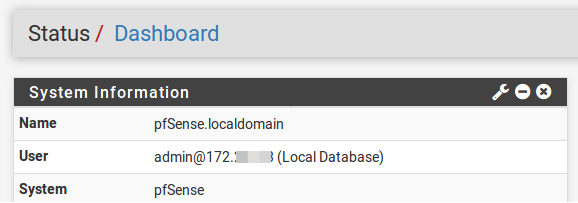
- File 25-08-2018_12_15_02.png 25-08-2018_12_15_02.png added
- File 25-08-2018_12_15_19.png 25-08-2018_12_15_19.png added
On 2.4.4.a.20180825.0917, when the user logs in, the dashboard and console indicate the IP of the user logging in and the authentication source. Screenshots attached (IP partially redacted).
Updated by Anonymous about 8 years ago
- Status changed from Feedback to Resolved
Actions