Actions
Bug #14227
closed
Traffic Shaper - selected scheduler not recognized
Bug #14227:
Traffic Shaper - selected scheduler not recognized
Status:
Duplicate
Priority:
Normal
Assignee:
-
Category:
Traffic Shaper (Limiters)
Target version:
-
Start date:
Due date:
% Done:
0%
Estimated time:
Plus Target Version:
Release Notes:
Default
Affected Version:
Affected Architecture:
All
Description
Limiter created and enabled with a child queue enabled, both saved and applied. Make change and save parent limiter, without applying, navigate to child queue or different limiter and then click apply. The page loads to a blank (no name) limiter with Tail Drop/FIFO selected as AQM/Scheduler. Actually creating a new limiter has default tail drop/worst case weighted selected.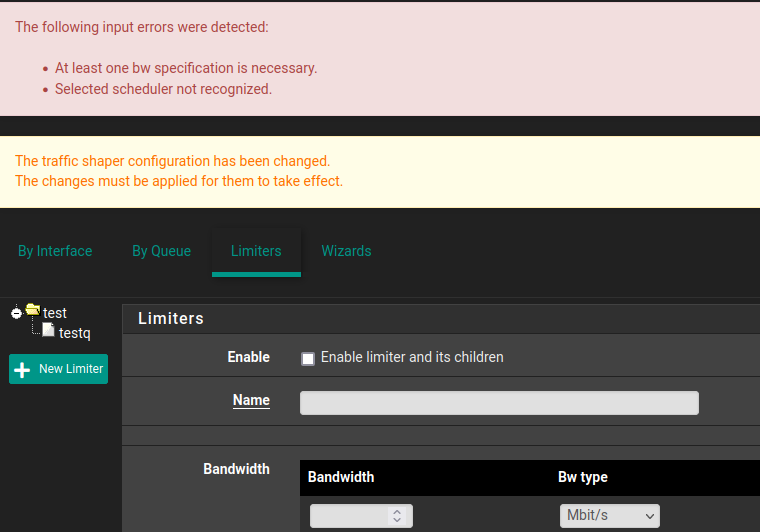
Files
 Updated by Jordan G over 3 years ago
looking at diagnostic>limiter info displays a limiter with tail drop/FIFO above the AQM/scheduler that are modifiable in the shaper GUI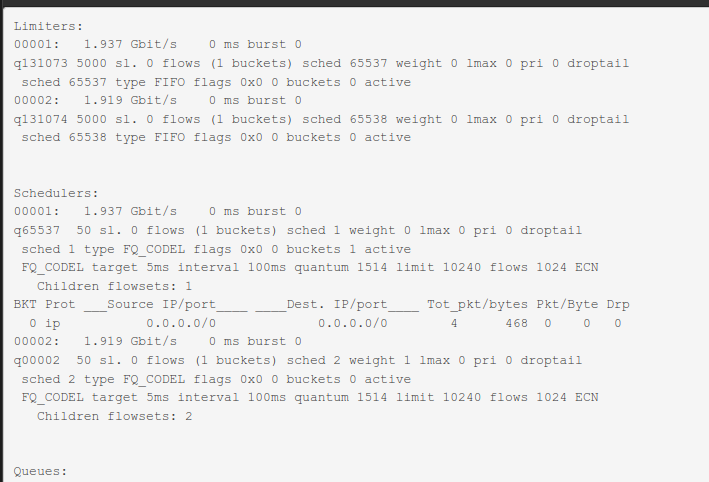
 Updated by Marcos M over 3 years ago
- Status changed from New to Duplicate
Updated by Marcos M over 3 years ago
- Is duplicate of Bug #13158: Input validation error when applying limiter changes added
Actions