Bug #16673
closedLDAPS TLS connections intermittently failing with 'Unknown CA (48)' error
0%
Description
(See my Netgate Forum post on the issue: https://forum.netgate.com/topic/200020/intermittent-tls-failures-with-ldap-auth-backend)
We have LDAP-based authentication configured and running on a pair of Netgate 6100 units. Each 6100 talks to a different LDAP server. Both systems are exhibiting the same behavior:
When connecting to LDAP via TLS, the authentication system occasionally fails to negotiate a TLS session with the LDAP server, resulting in an authentication failure. This can cause OpenVPN clients to not connect, or can cause pfSense administrators to be kicked out of their sessions. I have been dealing with both over the past couple days.
It should be noted that the certificates configured in the pfSense interface ARE correct, and the connection does succeed more often than not. However, every few authentication attempts will fail, and when this happens, the auth system seems to get locked into a non-operational state for a few moments before it starts authenticating again. The fact that we can authenticate at all would indicate to me that the certificates, CAs, and LDAP configs are in order, otherwise the connection would never establish and we would always fail authentication.
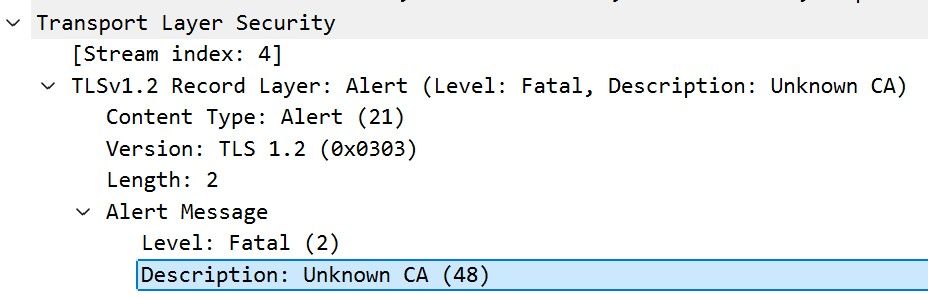
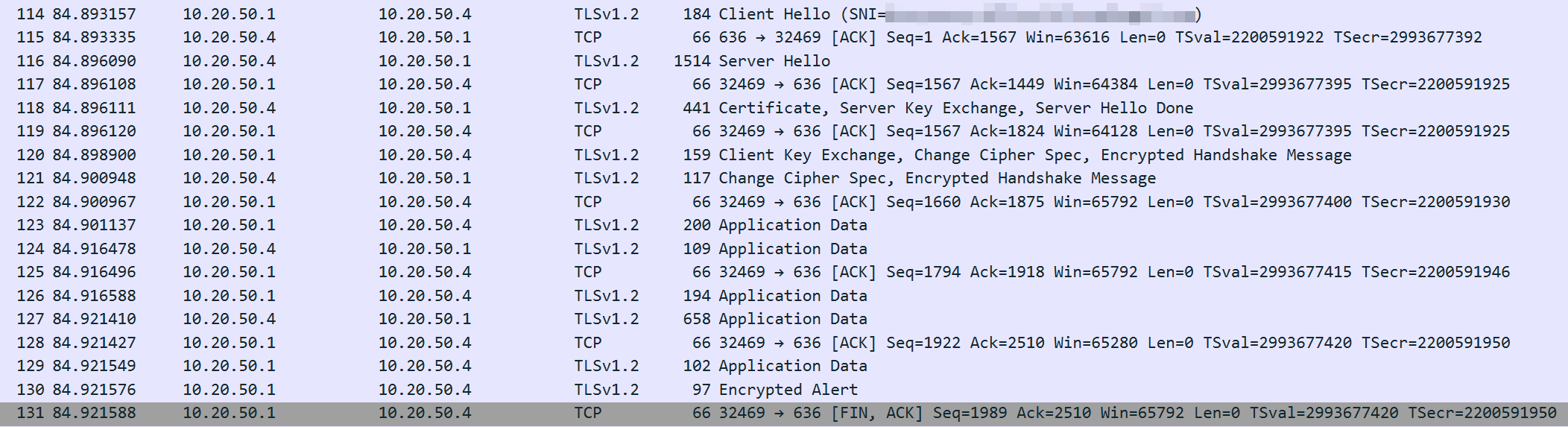
I have attached two screenshots from a Packet Capture (as seen from the pfSense LAN port, where the LDAP server resides). The first capture "successful-auth.png" shows the 6100 (10.20.50.1) making a successful auth query to the LDAP server (10.20.50.4) via TLS. The second image (failed-auth.png) is from ~45 seconds later, and shows a failed TLS handshake from the same system. There were no configuration changes or system alterations between these two auth attempts. There is a third screenshot with a little more info about the failed TLS handshake.
We also have a Duo Auth Proxy for 2FA authentication, and if we point pfSense to that, the DAP logs report the same issue when talking to pfSense. In the DAP log below, the "downstream application" is pfSense, and I have obfuscated the actual FQDN. DAP is able to talk to the upstream LDAP server via TLS without any issue.
[duoauthproxy.modules.ad_client._ADServiceClientFactory#info] Starting factory <duoauthproxy.modules.ad_client._ADServiceClientFactory object at 0x76308eee75c0>
[duoauthproxy.lib.log#error] Unable to establish SSL connection. Client may be attempting incompatible protocol version or cipher.
[duoauthproxy.lib.log#info] Aborting AD auth request to '<LDAP_FQDN>' because the Authentication Proxy lost the connection to the downstream application:
[duoauthproxy.modules.ad_client._ADServiceClientFactory#info] Stopping factory <duoauthproxy.modules.ad_client._ADServiceClientFactory object at 0x76308eee75c0>
[duoauthproxy.lib.log#info] Closing the connection between the downstream application and the Authentication Proxy. Reason: [('SSL routines', '', 'tlsv1 alert unknown ca')]
I have been unable to find a specific pattern to the TLS errors, but the common element appears to be the 6100 and/or pfSense 25.11[.1]. Both of our 6100 units are exhibiting this exact same behavior, whether they're making TLS-based connections directly to the LDAP server, or TLS-based connections to the Duo Auth Proxy. We just recently deployed these 6100s to replace some older non-Netgate hardware that we'd been using for pfSense Plus, and those older systems were completely bulletproof with this same configuration.
If we turn off TLS for the LDAP comms, the problem goes away completely, so this appears to be a TLS issue, not an LDAP protocol issue. Unfortunately, the Duo Auth Proxy requires TLS, so simply disabling TLS is not an option for the services that require it.
We have tried completely disabling Hardware Cryptographic Acceleration (+reroot-reboot), or switching between QAT and AES-NI/cryptodev, but the problem still persists, so it doesn't appear related to hardware acceleration.
Would love to get to the bottom of this. Happy to provide actual .pcap files, but would prefer not to post those to a public forum since they will contain potentially sensitive data.
Files

ML Updated by Michael Lake 8 months ago
Quick follow-up, trying to summarize what appears to be happening during a failed authentication attempt:
- pfSense initiates TLS handshake to LDAP server.
- LDAP server responds to TLS handshake with its certificate.
- pfSense says that it cannot verify the CA that signed the certificate it received from pfSense.
- TLS aborted, authentication fails.
Note that ALL of the certificates used for these communications were generated by pfSense using a self-signed CA that was also generated on pfSense and is in the internal trust store. For these LDAPS connections (and seemingly only the LDAPS connections), there appears to be a situation where the CA is failing to validate, but not every time.
I don't know if this is because the CA verification is being miscalculated/misread, or if the wrong CA is being used during these failed attempts. The only CAs on the pfSense box are the Global Trust Store and the self-signed root CA that anchors all of our internal long-lived certs (LDAP, OpenVPN, server web configs, etc.).
EO Updated by Erik Osterholm 8 months ago
- File deleted (
packetcapture-igc0-20260128090133.pcap)
ML Updated by Michael Lake 7 months ago
It appears that this bug has been fixed with https://redmine.pfsense.org/projects/pfsense/repository/2/revisions/37884c3039756e3868b7f995a3329793b771a6b0 (See https://redmine.pfsense.org/issues/16688).
JP Updated by Jim Pingle 7 months ago
- Status changed from New to Closed
Great, thanks for testing!
Closing this one in favor of #16688 since that had the root cause and this was a symptom.
JP Updated by Jim Pingle 7 months ago
- Project changed from pfSense Plus to pfSense
- Category changed from Certificates to Certificates
- Affected Plus Version deleted (
25.11.1)
JP Updated by Jim Pingle 7 months ago
- Related to Regression #16688: Creating a CA certificate with Trust Store checked is not trusted added