Bug #16677
openEditing of LAGG inteface which has lots of VLANs in it is very slow so it might confuse if it has finished or not
0%
Description
Tested on 25.11.1-RELEASE (built on Tue Jan 27 20:33:00 UTC 2026)
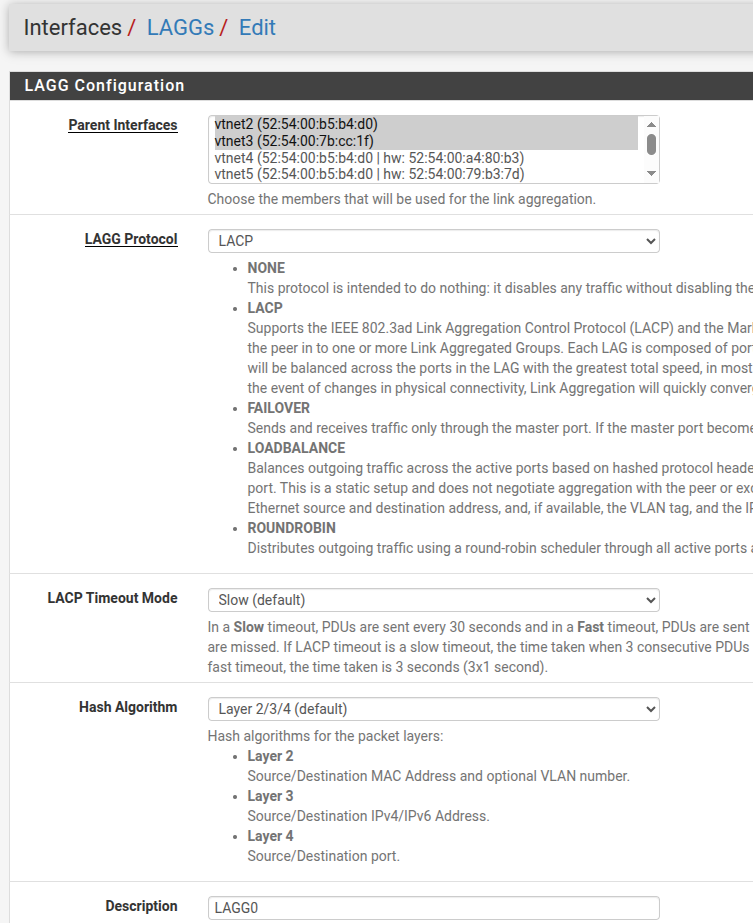
I've created LAGG0 on vtnet2 and vtnet3 ('Created LAGG0 on vtnet2 and vtnet3.png'), then I added 100 VLANs tied to LAGG0, assigned all these VLAN interfaces, enabled them and assigned static IPs on each of them.
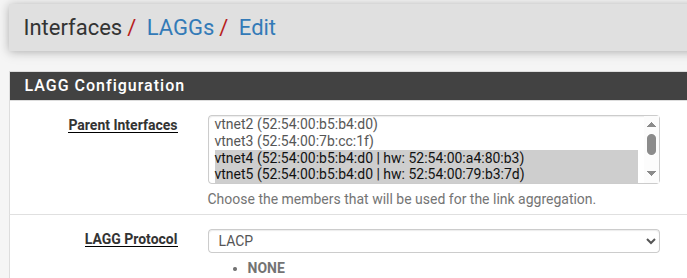
Then I tried to move LAGG to another interfaces: vtnet4 and vtnet5 ('attempt to move LAGG to vtnet4 and vtnet5.png'). When I presses 'Save', after couple of minutes I got “50x”/”Return to dashboard” error.
When I opened the Dashboard and check /Interfaces/Assignment/LAGG I saw that LAGG0 was still on vtnet2 and vtnet3 and in /cf/conf/config.xml I also saw the previous settings
    <laggs>
        <lagg>
            <members>vtnet2,vtnet3</members>
            <descr><![CDATA[LAGG0]]></descr>
            <laggif>lagg0</laggif>
            <proto>lacp</proto>
            <lacptimeout>slow</lacptimeout>
            <lagghash>l2,l3,l4</lagghash>
        </lagg>
    </laggs>
BUT ifconfig showed new interfaces
lagg0: flags=1008843<UP,BROADCAST,RUNNING,SIMPLEX,MULTICAST,LOWER_UP> metric 0 mtu 1500
    description: LAGGIntf
    options=8900b8<VLAN_MTU,VLAN_HWTAGGING,JUMBO_MTU,VLAN_HWCSUM,VLAN_HWFILTER,LINKSTATE,HWSTATS>
    ether 52:54:00:b5:b4:d0
    hwaddr 00:00:00:00:00:00
    inet6 fe80::5054:ff:feb5:b4d0%lagg0 prefixlen 64 scopeid 0xc
    laggproto lacp lagghash l2,l3,l4
    laggport: vtnet4 flags=0<>
    laggport: vtnet5 flags=0<>
    groups: lagg
    media: Ethernet autoselect
    status: active
    nd6 options=21<PERFORMNUD,AUTO_LINKLOCAL>
And correct settings occurred after about 10 minutes. So I changed nothing, but after 10 minutes, on /Interfaces/Assignment/LAGG and in /cf/conf/config.xml I finally saw the correct interfaces for LAGG0.
Customer who has similar design but he also has HA cluster and it takes 30 minutes on his 8300s to apply new settings which he makes on LAGG with 72 VLANs on it (HS#40846611586)
Files
AK Updated by Azamat Khakimyanov 7 months ago
- Subject changed from Editing of LAGG inteface which has lots of VLANs in it is very slow so it might confused to Editing of LAGG inteface which has lots of VLANs in it is very slow so it might confuse if it has finished or not
AK Updated by Azamat Khakimyanov 3 months ago
Tested on 26.03.1 and this time I created HA cluster with 100+ VLANs and after editing LAGG interface it took almost one hour for change to be applied.
AK Updated by Azamat Khakimyanov 3 months ago
Test 1
- Secondary node was powered off
- LAGG interfaces unassigned
Changing the LAGG settings on the Primary node took about 5–6 minutes to apply.
- Secondary node was powered off
- LAGG interfaces unassigned
- pfsync settings were removed
- CARP was disabled before the test
Changing the LAGG settings on the Primary node still took about 5–6 minutes to apply.
One interesting finding: even when CARP was disabled before the test, editing the LAGG settings caused CARP to become enabled again during the VLAN initialization process. If I pressed Disable CARP again, CARP was re-enabled after the next VLAN interface was initialized.
And I found this Bug I tested 3 years ago: https://redmine.pfsense.org/issues/12926