Bug #16751
open

Tailscale Package Fails to reconnect on reboot
0%
Description
I marked this as "Very High" because if a user is remotely connected to their system through tailscale, a reboot would totally lock them out since this bug prevents the service from reconnecting to the tailnet. It is only repairable on the local network or console.
| Package Versions | ||
|---|---|---|
| Name | Version | Comment |
| pfSense-pkg-Tailscale | 0.1.8 | pfSense package Tailscale |
| tailscale | 1.80.0 | Mesh VPN that makes it easy to connect your devices |
| pfsense | 2.8.1-RELEASE | Community Edition |
What works:
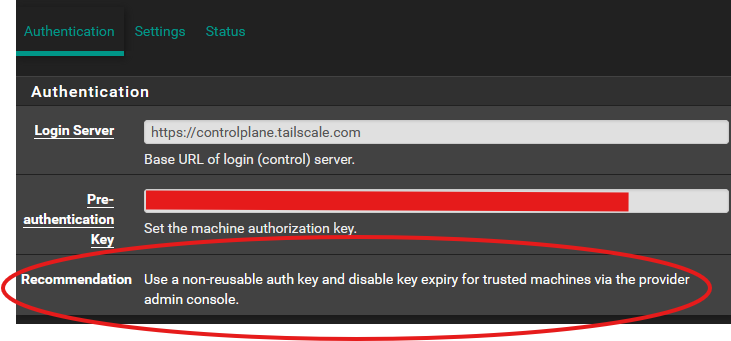
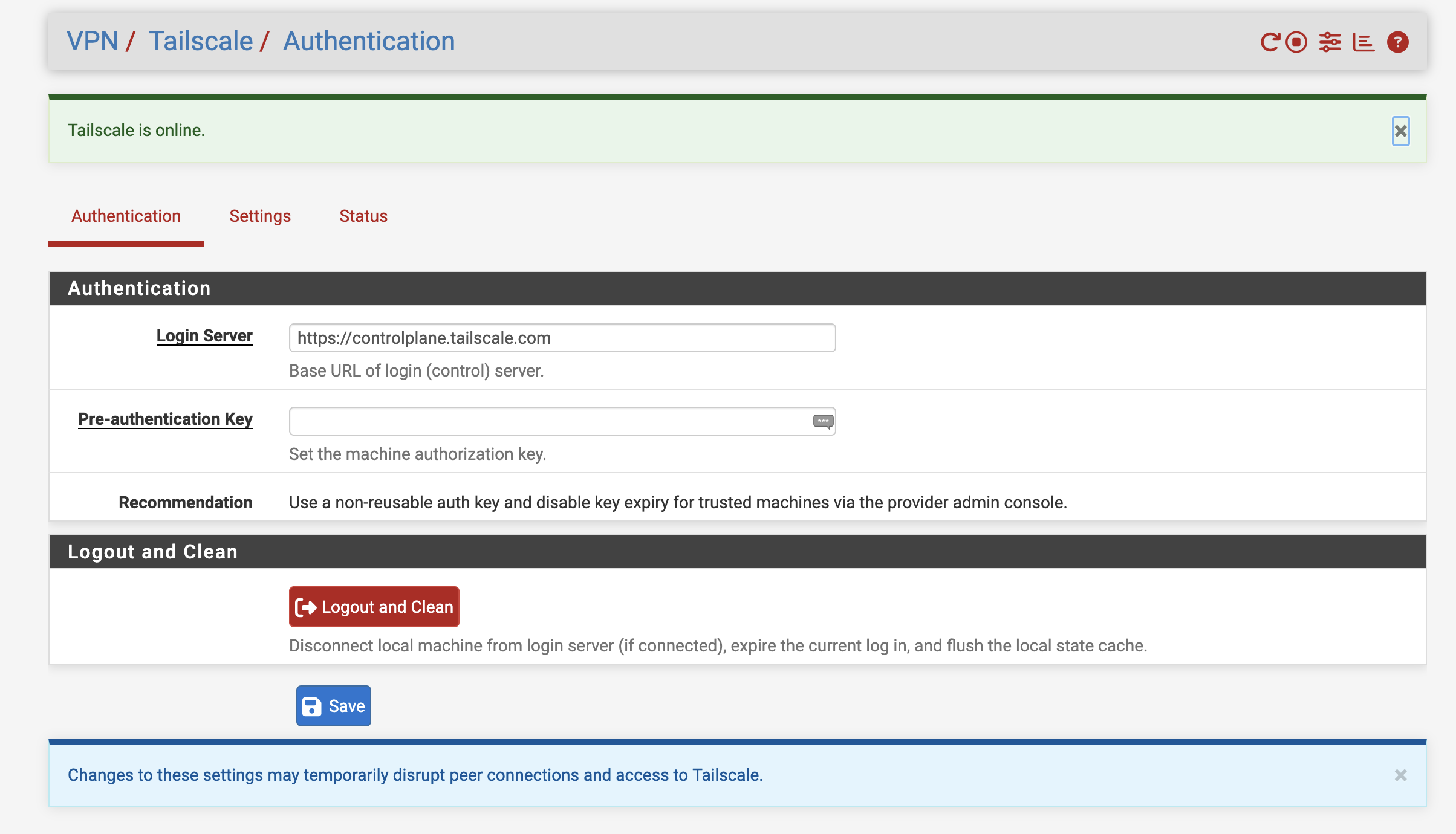
On a new install of the package, with a non-reusable auth key and the machine set to never expire (both recommended by the package itself), tailscale connects perfectly. Restarting the package also reconnects fine, as long as a reboot has not yet occurred.
What doesn't work:
If the system reboots, it attempts to run
tailscale upinvalid key: API key does not existCurrent workaround:
After boot completes and tailscale fails to connect, clear the flags and then bring the tailscale port back up with the flags needed via shell command
/usr/local/bin/tailscale up --reset --advertise-exit-node --advertise-routes=192.168.0.0/24,192.168.20.0/24,192.168.1.0/24 --accept-dns=falseOf course each user's flags will vary, those are just mine.
Proposed fix:
Add a checkbox that allows users to mark it as a non-reusable key. Marking it as such would then remove the
--auth-keytailescale upFiles
 Updated by → luckman212 5 months ago
possibly related: https://redmine.pfsense.org/issues/16784
 Updated by Paul Mavrovic 4 months ago
I have been experiencing this on many firewalls I manage.
Built some scripts that so far seem to alleviate this issue as a workaround.
currently testing these scripts across device reboots to see if the fix holds or eventually device fails to connect back to tailscale.
Ill post results in the next few days.
Updated by Paul Mavrovic 4 months ago
SO far the scripts work and none of the firewalls I manage via tailscale have dropped off like they used to.
The conclusion seems to be the same as you have already expressed that the residual key is to blame across reboots.
Once the key id removed from the equation, everything seems to work. I would also say if there was a button or procedure to clear out the generated key after joining the tailnet this should solve the issue.
Better yet, maybe there is a clear button that actually copies the key to a safe location / then if the pfsense endpoint admin decides to leave the tailnet they can click the logout and clean button that would retrieve they key used to then expire the connection.
Just thoughts here...
Cheers.
Updated by Paul Mavrovic 4 months ago
Error executing command (/usr/local/bin/tailscale status)
- Health check:
- - You are logged out. The last login error was: invalid key: API key does not exist
- - Unable to connect to the Tailscale coordination server to synchronize the state of your tailnet. Peer reachability might degrade over time.
unexpected state: NoState
It seems as you had predicted the presence of the key post reboots may be the cause.
Happy to test anything you might want on a few of my firewalls I have.
Updated by Paul Mavrovic 4 months ago
Here is the screenshot of post authkey cleanup done my my test script.
 Updated by R S 4 months ago
Paul Mavrovic wrote in #note-3:
Maybe there is a clear button that actually copies the key to a safe location / then if the pfsense endpoint admin decides to leave the tailnet they can click the logout and clean button that would retrieve they key used to then expire the connection.
Thanks for all your researching into the ticket. It's been nice seeing your updates. I gotta admit I'm not an expert in this, so I'm going to ask you for some clarification here.
1. As far as I have observed, a reusable key makes it so this specific issue is not occurring.
2. A non-reusable key is what causes the problem due to the fact that this package is trying to reuse it when upping the interface.
3. So why would there be an advantage in saving the key?
4. When expiring the connection, is that something being done on the tailscale admin portal?
5. If so, why is the key helpful or necessary for that?
Just hoping you can educate me a bit, because I have a pretty small tailnet and haven't had to do too much outside of what I believe to be the basics.
Thanks!
Updated by Paul Mavrovic 4 months ago
I am by no means an expert at this either.. However I am an avid Tailscale user that just started to dig into the problem.
SO as far as I know YES to point 1 you made by using a reusable key that does not expire supposedly the issue should not exist.
I have tried testing this on a bunch of firewalls and so long as the firewall does not reboot, Tailscale seems to rejoin properly. In some cases, I have had the firewall reboot and rejoin with no issue. However after about a week or 2, almost every firewall connecting to the tailnet required me to generate a new key to rejoin the tailnet and in my machines tab I would have to delete the old one, and re-tag the new instance and set it as non expiring.
After some reading of many posts and diving into the docs at Tailscale I decided to leverage ChatGpt for a little help to gain insight into the issue.
It seems that if one would manually remove the key from 2 config files on Pfsense, the issue would be resolved.
I tested this on my own firewall and it seems to work.
Here is the excerpt from the comments section of the script I created that describes the 2 files.. and the key removal.
1) Any line containing:
- <preauthkey>...</preauthkey>
- from:
- /cf/conf/config.xml
#
- 2) Any line matching:
- ^pfsense_tailscaled_authkey=
- from:
- /usr/local/etc/rc.conf.d/pfsense_tailscaled
#
I can make the script available if you wish for your own use.. I just dont want to jump ahead of any DEVS at PFsense to suggest any permanent fix.
Like I said I am NOT an expert at Tailscale nor at modifying any PFsense code.
but if you backup those 2 files and remove the authkey, it seems to fix the issue.
That is why I suggested to possibly just backup the key in case it was needed for some reason again, but I don't think there is a real need to do so.
Im happy to take this conversation to direct email with you if you wish.
What I forgot to finish explaining is that it seems that after a few reboots, somehow PFsense thinks it needs to present the AuthKey again to the tailnet on connection and Tailscale then says that the initial Pre-Auth key has already been used and therefore the connection is NOT allowed.
By removing the "memory" of the key from the config files across reboots, it seems to fix the issue.
Updated by Paul Mavrovic 4 months ago
R S wrote in #note-6:
Paul Mavrovic wrote in #note-3:
Maybe there is a clear button that actually copies the key to a safe location / then if the pfsense endpoint admin decides to leave the tailnet they can click the logout and clean button that would retrieve they key used to then expire the connection.
Thanks for all your researching into the ticket. It's been nice seeing your updates. I gotta admit I'm not an expert in this, so I'm going to ask you for some clarification here.
1. As far as I have observed, a reusable key makes it so this specific issue is not occurring.
Yes as far as I have seen if the key is re-usable the issue should go away. However as a security conscious person I would rather use one time keys to initiate the connection and then just set the connection to no expire in the use case of having access to the remote firewall.
2. A non-reusable key is what causes the problem due to the fact that this package is trying to reuse it when upping the interface.
Yes It appears that when the firewall comes up the key gets re-populated and tries to re-auth with Tailscale, triggering the denial due to re-use of a one time key.
3. So why would there be an advantage in saving the key?
I only suggested saving the Key just in case there was a use case, however
4. When expiring the connection, is that something being done on the tailscale admin portal?
YES one can expire the connection from the tailscale machines interface.
However it might also be nice if there was a way to have a button in the fireweall interface to "Disconnect and and Delete from Tailnet"
5. If so, why is the key helpful or necessary for that?
I was just thinking that maybe a remote endpoint may want to "disconnect" from a Tailnet. However in practice, one can just remove the tailscale package and ahev it completely clean the config files to completely disconnect.
Just hoping you can educate me a bit, because I have a pretty small tailnet and haven't had to do too much outside of what I believe to be the basics.
Thanks!
Ive answered your questions to the best of my ability.
Updated by Paul Mavrovic 4 months ago
Just a general comment...
SO far I have used the modifications I have described on about 6 firewalls. NONE of them has dropped from Tailscale as of yet.
I have 2 other firewalls that I am leaving alone as a control group... SO far both of them dropped off after about a week. Granted, this is mainly due to a remote reboot by the customer.
- On a firewall that has Tailscale, I would also have an instance of OpenVPN or other means of access so that just in case Tailscale drops once can still get into the firewall.
- I have not seen any side effects so for on any of the firewalls I have made these modifications to.
- After any new firmware update or update to the tailscale package for PFsense, Im pretty sure one will need to create these modifications once again to keep things working until a more permanent fix is introduced.
Ill post any updates to this if I see any changes take place.
Updated by Paul Mavrovic 4 months ago
- File Tailscale_Settings.png Tailscale_Settings.png added
SO just another follow-up:
I am trying to think what happens when the Tailscale package gets updated the way it currently is without removing the code that keeps Auth Key present.
These are the base assumptions.
- Current version Tailscale Package 0.1.9_2
- The script I have is applied after already joining the Tailnet and the expiry is disabled on the Tailscale Interface.
- The user has backups of the original config files "Just in case"
If a new package comes out, it would upgrade / replace the existing one retaining the configs if the checkbox is seleected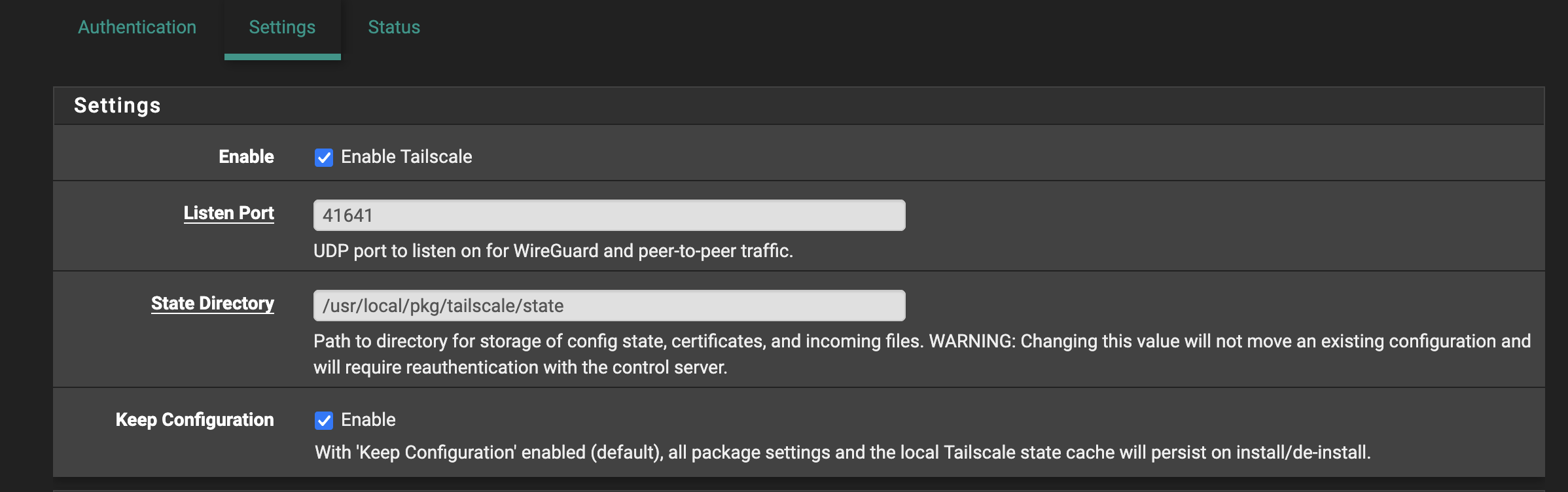
SO this will bring forward any preset advertised routes.
The user updates the Tailscale package.
I have seen that in some cases after the upgrade one must re-issue a new auth key BUT im not sure IF that was due to the reboot issue expring the key due to the bug we have OR if that was the intended function of Tailscale post upgrade. ( On other devices like Rasperry Pi's the key does not Expire on an update!)
- User updates Tailscale to new version
- Optionally reboots firewall if needed
- Since the previous Auth-Key is NOT present in the 2 config files it "SHOULD NOT" re-populate.
- Ideally the tailacale connection should come up.
- If the end user has to generate a new key for some reason, they would need to re-run the script to remove the persistent once time use Auth-Key from coming back.
This is just the way I am going through the process as I understand it...
I am going to test this when a new Tailscale package becomes available.
Please correct me if I am wrong!
Updated by Paul Mavrovic 4 months ago
Just want to add another update.
Once of my "Control Firewalls" without the Auth key cleanup patch fell off the Tailnet after a reboot due to all the reasons we have already identified.
As a test I wanted to see IF I just simply clear out the offending AuthKey, would the firewall re-connect WITHOUT needing to generate a new Auth Key.
I ran the cleanup script on the firewall and tailscale automatically re-connected to the network.
This is good to know because essentially this confirms that the overall error IS the re-populating one time use auth key and that so long as the endpoint is set to NOT expire, the device will reconnect...
I hope this helps.
Updated by Paul Mavrovic 4 months ago
SO just another update...
After applying the patch to several of the firewalls I have in the field that are subject to reboots due to a number of circumstances, none of them has disconnected from the tailnet as of yet.
Prior to this this, these firewalls would always need to be re-keyed to stay connected about every 1-2 weeks.
If requested I can make the script I am using available for others to test.
Updated by Paul Mavrovic 4 months ago
Another update:
I have patched all my managed firewalls with the script and none of them have disconnected at all since.
Granted this patch is a temp fix until the package gets updated, its seems to work.
Only issue I see is if a new Tailscale PKG becomes available, one would have to run the script again to remove the key unless it gets fixed.
Updated by Paul Mavrovic 3 months ago
SO just an update after the latest PFSense plus update to 26.03.1
I performed the update on my lab firewall...
Watching the upgrade process move forward I saw a new version of the Tailscale package get installed ( 1.94.1 )
after the reboot the tailscale connection re-connected successfully without having to re-issue a new key.
I will follow this for the next few days to see if tailscale disconnects after a few days.
It seems possible that after an update if there is no vestige pre-auth key present, tailscale re-connects based on the previous approval?
I tested Stopping / re-starting service several times to see if maybe it might not re-connect, but so far it seems to always connect up.
Updated by Paul Mavrovic 3 months ago
If anyone wants a copy of my script, let me know, I will get it up on github in the next week or so.
Also available in: Atom