Bug #14605
closedDynamic DNS uses the default gateway interface instead of the specified interface
Added by Marcos M about 3 years ago. Updated about 1 year ago.
100%
Description
- Configure a gateway group with WAN1 (tier 1) and WAN2 (tier 2), and set it as the default system gateway.
- Configure Dynamic DNS on WAN2.
This results in DDNS using the current default gateway (WAN1) instead of the specified interface (WAN2).
Files
| asiabell.jpg (46.3 KB) asiabell.jpg | Stepan Afonin, 12/30/2023 05:16 AM | ||
| beeline.jpg (49.2 KB) beeline.jpg | Stepan Afonin, 12/30/2023 05:16 AM | ||
| dyndns.jpg (46.7 KB) dyndns.jpg | Stepan Afonin, 12/30/2023 05:16 AM | ||
| gw groups.jpg (15.4 KB) gw groups.jpg | Stepan Afonin, 12/30/2023 05:16 AM | ||
| states error.jpg (124 KB) states error.jpg | Stepan Afonin, 12/30/2023 05:16 AM | ||
| default gw group.jpg (42.1 KB) default gw group.jpg | Stepan Afonin, 12/30/2023 05:29 AM | ||
| gw groups.jpg (72.5 KB) gw groups.jpg | Stepan Afonin, 12/30/2023 05:29 AM |


MM Updated by Marcos M about 3 years ago Actions #1
- Subject changed from Dynamic DNS does not ignore gateway group when set to a specific interface to Dynamic DNS always uses the default gateway interface instead of the specified interface
MM Updated by Marcos M about 3 years ago Actions #2
This seems to be due to the Check IP Service using the default gateway which happens because the WANs are both RFC1918.
MM Updated by Marcos M about 3 years ago Actions #3
- Related to Feature #14610: Add source address option to Check IP Services added
DZ Updated by Danilo Zrenjanin about 3 years ago Actions #4
I followed the steps to reproduce the issue. However, in my case, the Dynamic DNS used the WAN2 as defined.
1. Configured Gateway Group and defined it as the default gateway for the firewall.
2. Defined Dynamic DNS setup using Digital Ocean as the service type and set WAN2 for the Interface.
3. On the upstream device, I blocked all the traffic for the WAN1 interface (except ICMP to keep the WAN1 up).
4. The Dynamic DNS server regularly updated the A record using the WAN2 interface.
5. I was able to capture packets on the WAN2 during the Dynamic DNS update process.
MM Updated by Marcos M about 3 years ago Actions #5
- Subject changed from Dynamic DNS always uses the default gateway interface instead of the specified interface to Dynamic DNS uses the default gateway interface instead of the specified interface when behind NAT
SA Updated by Stepan Afonin over 2 years ago Actions #6
- File asiabell.jpg asiabell.jpg added
- File beeline.jpg beeline.jpg added
- File dyndns.jpg dyndns.jpg added
- File gw groups.jpg gw groups.jpg added
- File states error.jpg states error.jpg added
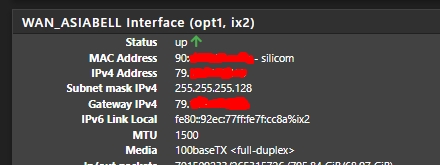
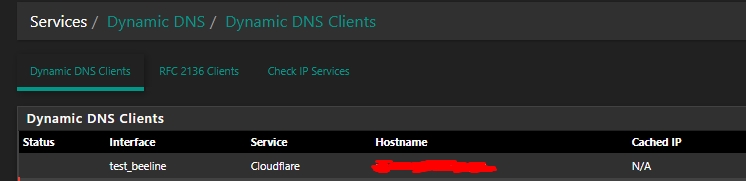
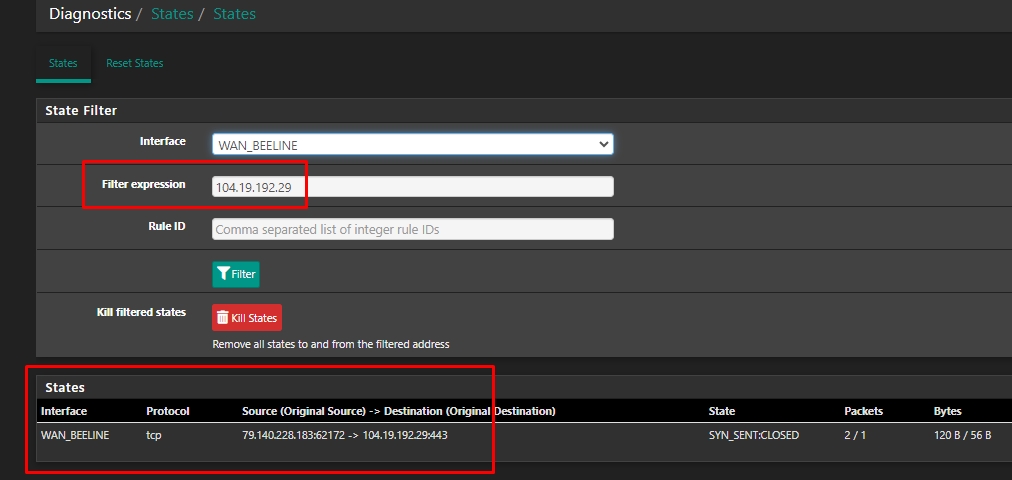
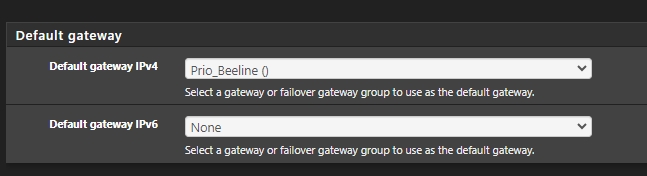
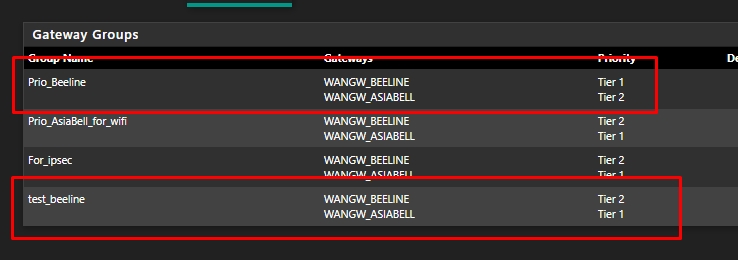
Good afternoon. I can confirm that there is an error, but for some reason netgate does not want to investigate it (if I’m wrong, please tell me, is it not configured correctly? The change request comes from the default gateway, but from ip wan2(opt1)
I use netgate 6100 equipment with version 23.09.1
SA Updated by Stepan Afonin over 2 years ago Actions #7
- File default gw group.jpg default gw group.jpg added
- File gw groups.jpg gw groups.jpg added
MM Updated by Marcos M almost 2 years ago Actions #8
- Subject changed from Dynamic DNS uses the default gateway interface instead of the specified interface when behind NAT to Dynamic DNS uses the default gateway interface instead of the specified interface
- Status changed from New to Pull Request Review
- Assignee set to Marcos M
- Target version set to 2.8.0
- Plus Target Version set to 25.01
JP Updated by Jim Pingle almost 2 years ago Actions #9
- Plus Target Version changed from 25.01 to 25.03
MM Updated by Marcos M almost 2 years ago Actions #10
- Status changed from Pull Request Review to Feedback
- % Done changed from 0 to 100
MM Updated by Marcos M over 1 year ago Actions #11
- Status changed from Feedback to Resolved
JP Updated by Jim Pingle about 1 year ago Actions #12
- Plus Target Version changed from 25.03 to 25.07
Also available in: Atom