Actions
Bug #16692
closed

OSPFv3 not active on an interface
Start date:
Due date:
% Done:
100%
Estimated time:
Plus Target Version:
Affected Version:
Affected Plus Version:
Affected Architecture:
Description
Tested on 25.07.1
I created simple config with OSPF and OSFPv3 on WAN with IPv4 and IPv6 addresses so the final config was
##################### DO NOT EDIT THIS FILE! ######################
###################################################################
# This file was created by an automatic configuration generator.  #
# The contents of this file will be overwritten without warning!  #
###################################################################
!
frr defaults traditional
hostname pfSense25071.mydomain.lanlocal
password cisco
service integrated-vtysh-config
!
ip router-id 192.168.123.237
!
interface vtnet0
 description "ospfd: OSPF on WAN"
 ip ospf area 0.0.0.0
!
router ospf
 ospf router-id 192.168.123.237
 area 0.0.0.0 shortcut default
!
router ospf6
 ospf6 router-id 192.168.123.237
 area 0.0.0.0 range 2001:470:6393:fa01::151/128 cost 1
 interface vtnet0 area 0.0.0.0
!
line vty
!
Then I updated my pfSense up to 25.11.1 and ipv6 ospf6 area 0.0.0.0 line disappeared from WAN interface and never occurred again whatever I did:
- I restarted FRR/Zebra
- I restarted OSPFv3
- I deleted WAN from OSPFv3 config and then added it back again
- I rebooted firewall
but nothing helped. Final OSPF config always stayed the same
##################### DO NOT EDIT THIS FILE! ######################
###################################################################
# This file was created by an automatic configuration generator.  #
# The contents of this file will be overwritten without warning!  #
###################################################################
!
frr defaults traditional
hostname pfSense25071.mydomain.lanlocal
password cisco
service integrated-vtysh-config
!
ip router-id 192.168.123.237
!
interface vtnet0
 description "ospfd: OSPF on WAN"
 ip ospf area 0.0.0.0
!
router ospf
 ospf router-id 192.168.123.237
 area 0.0.0.0 shortcut default
!
router ospf6
 ospf6 router-id 192.168.123.237
 area 0.0.0.0 range 2001:470:6393:fa01::151/128 cost 1
 interface vtnet0 area 0.0.0.0
!
line vty
!
so OSPFv3 was not activated on WAN even if I saw it in OSPFv3 config ('WAN interface in OSPFv3 config.png') and /cf/conf/config.xml also had these lines
<frrospf6dinterfaces>
            <config>
                <interface>wan</interface>
                <descr></descr>
                <networktype></networktype>
                <passive></passive>
                <mtuignore></mtuignore>
                <interfacearea>0.0.0.0</interfacearea>
                <instanceid></instanceid>
                <metric></metric>
                <routerpriorityelections></routerpriorityelections>
                <hellointervalinseconds></hellointervalinseconds>
                <deadtimer></deadtimer>
                <retransmitinterval></retransmitinterval>
                <bfdenable></bfdenable>
This issue was reported by the customer (HS#41197504172) and customer wrote that he was able to solve this issue by manually adding into FRR config the ipv6 ospf6 area 0.0.0.0 line on interface he needed OSPFv3 on via vtysh console.
Files
 Updated by
  Updated by
  Updated by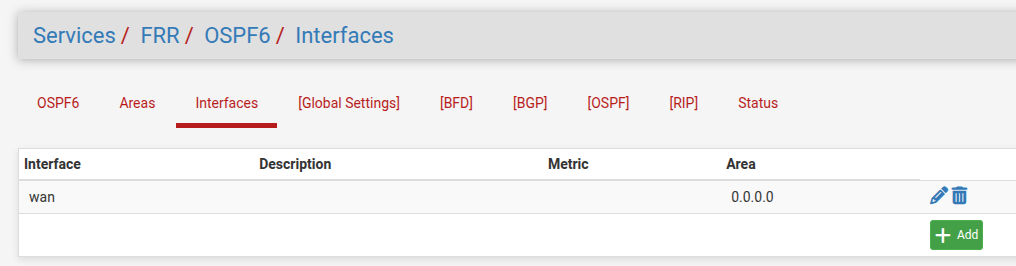
Actions