Bug #16756
closedEditing a Firewall Rule before Forcing pfBlockerNG Update Empties All Aliases
100%
Description
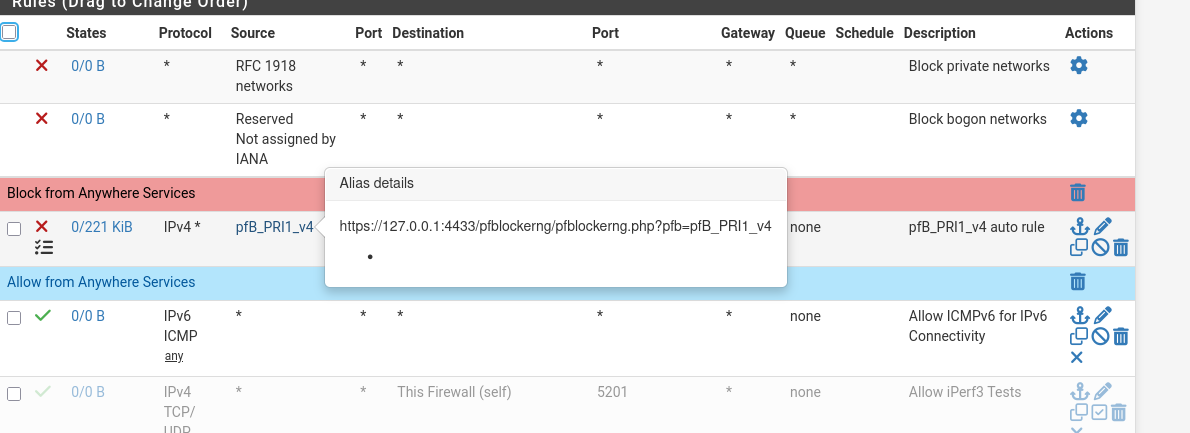
When editing a firewall rule and then forcing a pfBlockerNG Update command, all aliases will become empty until you run a force reload in pfBlockerNG.
Steps to reproduce:
1. Edit any firewall rule (doesn't need to be a pfBlockerNG rule)
2. Go to Firewall --> pfBlockerNG --> Update, select "Update" and run
3. Go to Firewall --> Rules and hover over any firewall rule with a pfBlockerNG alias. The alias will be empty.
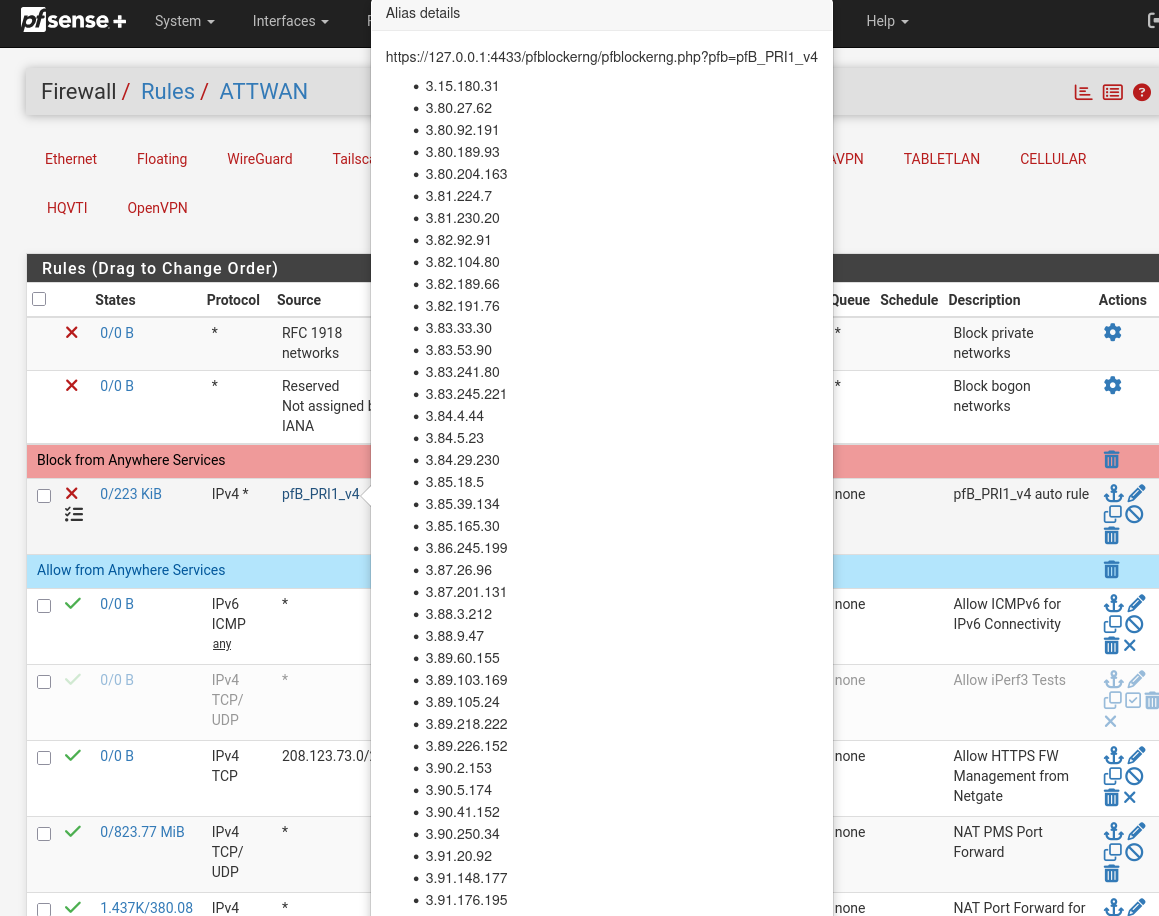
To resolve, you must go to Firewall --> pfBlockerNG --> Update and run a "Reload" to fix the issue.
Files
KP Updated by Kris Phillips 6 months ago
- File FixedRulesAfterForceReload.png FixedRulesAfterForceReload.png added
- File EmptyRulesAfterUpdate.png EmptyRulesAfterUpdate.png added
Tested on pfBlockerNG 3.2.15_2. Going to Status --> Filter Reload and manually reloading there does not fix it.
Output of pfSsh.php playback pfanchordrill:
###################- translation rules
###################
nat-anchor "natearly/*" all {
}
nat-anchor "natrules/*" all {
}
rdr-anchor "tftp-proxy/*" all {
} ############## - filter rules
##############
anchor "openvpn/*" all {
}
anchor "ipsec/*" all {
}
anchor "userrules/*" all {
}
anchor "tftp-proxy/*" all {
}
KP Updated by Kris Phillips 6 months ago
Something of note: I have Alias Deny set for my GeoIP rules. Not Deny, Match, or Permit.
SY Updated by Steve Y 6 months ago
Forum thread: https://forum.netgate.com/topic/200372/pfblockerng_devel-on-25.11.1-instability/
Per your note, the routers on which I replicated it use Alias Native or Deny for GeoIP.
Disabling a rule is sufficient to trigger this.
MM Updated by Marcos M 6 months ago
The issue is triggered when the pfBlockerNG update/reload detects a change to aliases and/or rules and the resulting ruleset file is the same as before the pfBlockerNG update/reload process.
For example:- Set up LAN with a single allow-all rule (remove existing rules then create a new one).
- Apply any changes.
- Set the pfBlockerNG rule order to "Default format".
- Set up pfBlockerNG with an IP list set to "Deny Outbound".
- Run a forced pfBlockerNG update.
- Move the auto-created rule from the top to the bottom (don't apply changes).
- Run a forced pfBlockerNG update.
At this point the pfBlockerNG alias referenced in the auto-created rule is empty. This happens because during the forced update pfBlockerNG sets the firewall config, kills all (pfB_*) pf tables with pfctl -t <table> -T kill, and then runs a filter reload. The firewall config has now essentially been rolled back to before the rule was manually moved in the above steps. Additionally since 1) changes were not previously applied (in step 1), and 2) the ruleset file doesn't contain the table contents itself, then the ruleset file remains unchanged and the pf ruleset reload is skipped. That ruleset reload is currently responsible for repopulating the killed pf tables.
The issue can be fixed by having pfBlockerNG kill its pf tables only if they are no longer referenced in a rule. This change would retain what seems to be the original intent of the code while also being more efficient (only the necessary tables are cleared and the ruleset is only reloaded when needed).
Potential fix: Show
MM Updated by Marcos M 6 months ago
- Status changed from Ready To Test to Resolved
- Target version set to 2.9.0
- % Done changed from 0 to 100
- Plus Target Version set to 26.03
- Affected Version set to 2.9.0
Applied in 0083e293bf9ef47bf8b7f88eb954f80c5fb9dd15.
Fix will be part of pfBlockerNG-devel for now and picked to non-devel later.
KP Updated by Kris Phillips 6 months ago
- Status changed from Resolved to In Progress
Checked 26.03-RELEASE build repos and the pfBlockerNG devel and stable branches are both still the same version.
Marking as In Progress until the package is rebuilt and bumped in version.
MM Updated by Marcos M 5 months ago
- Has duplicate Bug #16812: GUI alias and rule changes are not applied to the running PF ruleset ( pfctl -sr / pfctl -t unchanged), causing new firewall rules to not work, likely due to pfBlockerNG overriding tables. added
MM Updated by Marcos M 5 months ago
- Has duplicate deleted (Bug #16812: GUI alias and rule changes are not applied to the running PF ruleset ( pfctl -sr / pfctl -t unchanged), causing new firewall rules to not work, likely due to pfBlockerNG overriding tables.)